For Unito (opens in a new tab) · Nov 2022 – Jul 2023
Supporting Retention by Empowering Users to Craft Their Ideal Workflow
At a Glance
Recap
Unito made creating a flow easy. But once it was launched, users couldn't tell what synced, what failed or why. We had to improve the monitoring and troubleshooting journeys to increase usage, support user retention and reduce support tickets.
My Role
Lead UX researcher and product designer. I led the research end to end and shaped the solution with the PM and tech leads.
Team
- Andrew ↗ (opens in a new tab), Product designer
- Graham ↗ (opens in a new tab), Product Manager
- Nilovna ↗ (opens in a new tab) and Chrys ↗ (opens in a new tab), Tech leads
Outcome · first 6 months
Shipped to all customers in July 2023. Customer-facing teams championed it before it even shipped.
- ~1,650users leveraged the solution to dig into why an item didn’t sync.
- ~300users used the “sync one item” feature to test and fix.
- 203users searched an item by its URL.
01Context
Great at Starting a Sync. Less So at What Came Next.
Unito connects people's favorite work tools with two-way sync. It grows through product-led growth: the product should sell itself, so sales and success teams can focus on high-potential accounts instead of how-to questions.
For years, we polished flow creation. What came after it, monitoring and troubleshooting, got much less love.
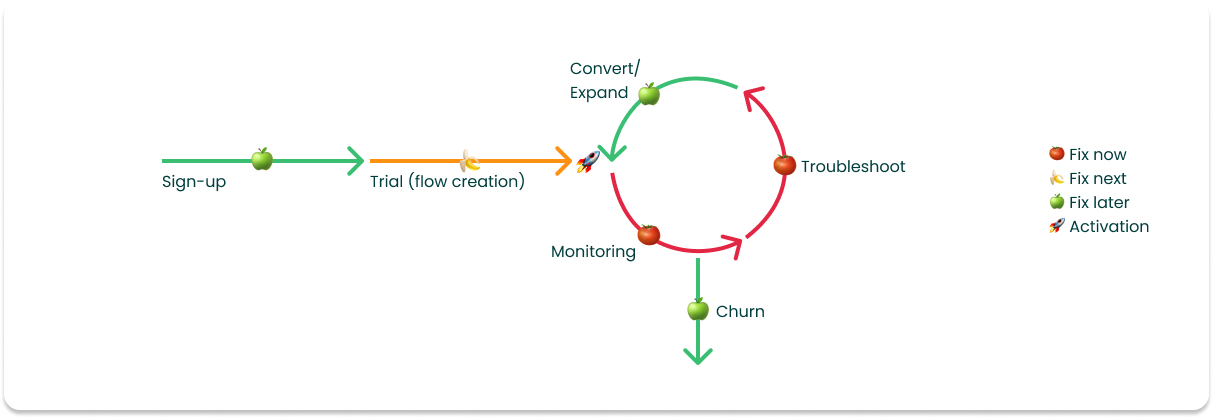
Related Missed Opportunities for the Business
1Remove blockers to conversion
The aha moment is seeing data start to sync. But syncing isn't the same as working as expected, and that gap leads to frustration and drop-off.
2Improve the end-to-end journey
Flow creation got the attention. Troubleshooting, flow management and iteration were left behind.
3Free up customer success
More autonomous users means fewer low-value tickets, and more time for high-potential accounts.
Our problem statement
How might we help users see their sync is truly working, and fix it on their own when it isn’t?
02Process
How We Tackled the Problem
We ran the research in three phases: discover, explore through co-creation workshops, and evaluate through user tests. I led the qualitative side, while Graham, the PM, led the quantitative side.
From Findings to Decisions
| Criticality | What we found | What we did |
|---|---|---|
| High | Key connectors lacked advanced options (e.g. trigger a sync back when an amount is higher than X) | Passed to the connectors team to feed a broader sync engine improvement project, later tackled in the sync conditions project (opens in a new tab) |
| High | Information didn't match users' mental models | A dedicated Activity tab and search by URLHandled in this project |
| High | Statuses were inconsistent across the product | A new “Retrying” statusHandled in this project |
| High | Errors were hard to understand and resolve | Plain-language error reasonsHandled in this project |
| Medium | Resyncing slowed down every test-and-learn cycle | Sync one itemHandled in this project |
| Medium | Hidden tools and unpredictable defaults | Tackled in the activation project (opens in a new tab) |
Research sources
- Data analytics
- Survey results (Most recent activity table)
- Insights from previous research
- User recordings
- Feedback from customer support and sales teams
- Chat analysis from HubSpot
- 12 user interviews
Main Design Tools Used for Prioritization
Limited Integration Options
Misaligned Information Hierarchy
Troubleshooting Gaps
Workshop 1
Ideation on Pain Points
Each pain point got its own space, one sticky note per idea. Nothing was too bold at this stage: the goal was to go wide before thinking about feasibility.
Workshop 2
Prioritization, Together
With Graham and the tech leads, we placed each idea on an effort/impact grid to find quick wins and high-value bets. Ideas that depended on other squads (sync engine, connectors) were pitched for their roadmaps.
03Solution
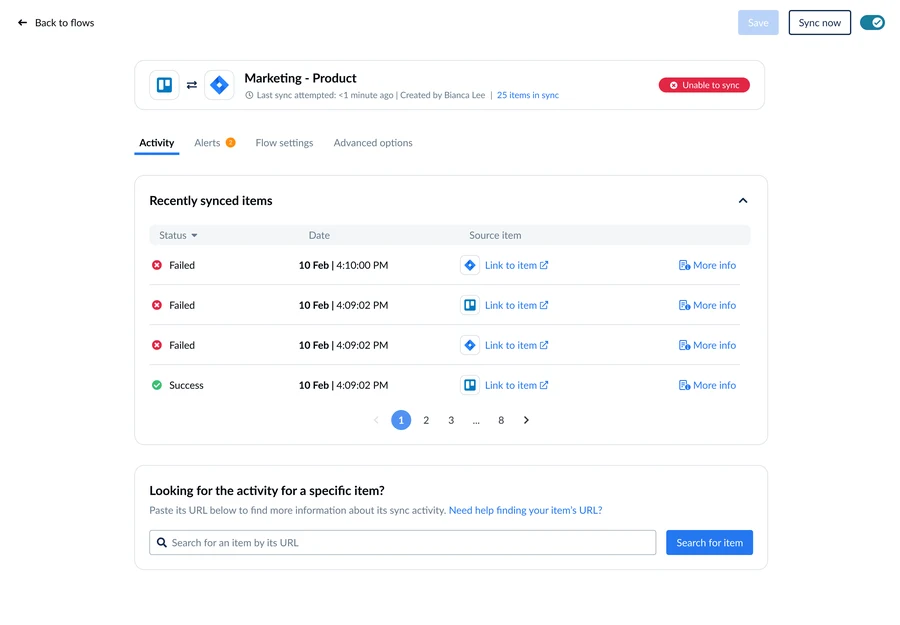
Five Changes, One Clear Activity View
Recently synced items
Looking for the activity of a specific item?
Paste its URL below to find more information about its sync activity. Need help finding your item's URL?
Activity
⊗ This item did not sync because of the following issue:
Get more help with this item
- Technical guide: connecting your Jira account to Unito
- What permissions do Jira users need?
- Limitations of Unito's Jira integration
Item ID: 0a1d2… · Flow: Marketing – Product
Low-fidelity mockups to illustrate the main changes.
04Outcome
Tested, Rolled Out Carefully, Used
- Feb 2023
Tested Before Building
User tests with internal and external users. Customer-facing teams became the strongest advocates, expecting it to ease their work. It did.
- One month
Progressive Rollout
We released it to a new cohort first. The effect on conversion was neutral, so we kept going.
- Jul 2023
Live for Everyone
Rolled out to all customers, then evaluated over six months.
Six Months Later
Customer-facing teams adopted it in their daily work with customers.
What the Numbers Don't Say
- Activation-to-conversion rose after release, but other changes shipped at the same time.
- Tickets went down overall, but this feature's share is hard to isolate.
- NPS stayed stable.
- Some resolution paths still weren't self-explanatory.
05Retrospective
What I'd Do Differently
Measure from Day One
I'd set up support-ticket tagging before launch, so we could see exactly how much this work reduced tickets.
Bring the Connectors Team In Earlier
Many fixes depended on their resolution paths. Involving them from the start would have made fixing errors truly self-serve sooner.